Martes, Marso 14, 2017

Lesson 18: Tablets for Textbooks in School

For Philippine schools even for private ones catering to children of the well I to-do families, the so called tablet -for a learning is still futuristic. Give however, the recognize impact of technology in education, the future may not be too far away.

 Image result for tablet -for a learning

Today, books are still the primary medium in instruction in most schools.it is doubtful if these will totally be replace by digital technology reading tool ,but there are now perceptions that virtual literacy May very well ease out textual print literacy. Already, he disadvantages of using books for learning are being debated upon. For school-graders, the load of books and wordbooks for every subject are backbreaking due to their weight and size. In developing countries, one book for every student is still a goal, not a reality. Publishing and printing millions of books for millions of public school children are just too expensive for the public purse. The errors in public school textbooks have also been exposed, errors resulting from wrong information, technical mistakes, and editorial lapses.

Image result for tablet vs. textbook

Image result for tablet vs. textbook

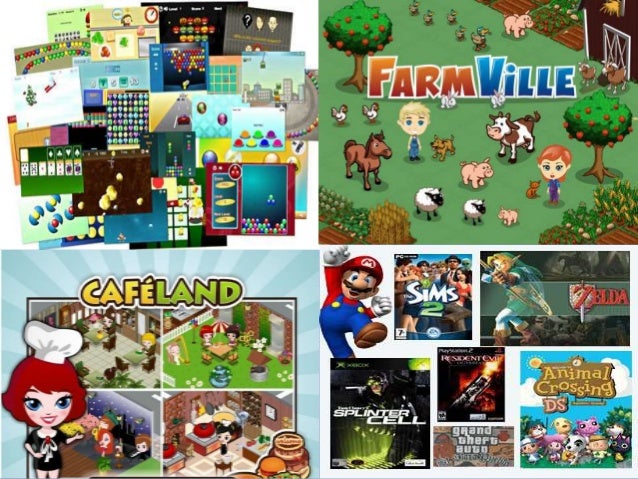
Today, technology is being viewed as a savior. Given the fact that students are enamored y computer games which take much of their time at home, educators have begun to think that the computer screen can very well serve as a powerful educational medium. Already computer games have been adopted in developed countries as a learning technology along with other audio-visual aids to teaching and learning. Classroom instruction which rides the vehicle of gaming admittedly makes learning more effective and more fun. From studies, educational video gaming has been shown to inculcate competencies that relate to learning concentration, lasting memory recall and higher visual literacy.


Tablets for school

Image result for tablet for school


The two – book and tablet – have their advantages and disadvantages, however, in this present situation, since our government cannot afford to give everyone this yet (although tablets are less expensive than PCs), we have to use the books that we have (no wonder, books still remain to be the number one instructional material in the Philippines). Books are no less different than those book that has become an EBook in tablets. If one can afford to buy a tablet now, then that’s good but schools should not make it necessary to have this in school if the majority cannot afford it. The use of tablets instead of books is still a choice, not mandatory, hence a teacher can still teach using a book, and it has not yet become useless

Lesson 16: The Internet and Education

Getting around the Net

Image result for getting around the net

The vast sea of information in the Internet, including news and trivia, is a challenge to those who wish to navigate it. Every day, the Net user-population and the available information continue to grow, and new ways are being developed.

Image result for internet and educationImage result for internet and education

The most attractive way to move around the Internet is called browsing. Using a program called a browser; the user can use a mouse to point and click on screen icons to surf the Internet, particularly the World Wide Web (the web), and an Internet's subset of text images, and sounds are linked together to allow users to access data or information needed. The future of the Internet seems limitless. Already its complexity has spawned and continues to spawn Net sites including new demand for services to business, industries, science, government and even homes. Many experts predict that the Internet is destined to become the centerpiece of all online communications on the planet and in some future time in the solar system using interplanetary satellite communication stations.

Image result for browsingImage result for communication through internet

Lesson 15: Understanding Hypermedia

Image result for hypermedia

Hypermedia is nothing but multimedia, but this time packaged as an educational computer software where information is presented and student activities are integrated in a virtual learning environment. Most educational IT applications are hypermedia and these include:

•             Tutorial software packages

Image result for tutorial software packages

•             Knowledge webpages

Image result for knowledge webpages

•             Simulation instructional games

Image result for Simulation instructional games


Learning project management, and others

Image result for Learning project management

The presentation of information-learning activities in hypermedia is said to be sequenced in a non-linear manner, meaning that the learner may follow his path of activities thus providing an environment of learner autonomy and thinking skills.

Characteristics of hypermedia applications:

Learner control- the learner makes his own decisions on the path, flow of events of instruction.

Image result for Learner control

Learner wide range of navigation routes- the learner has a wide range of navigation routes such as by working on concepts he is already familiar with. He may even follow a linear or logical path, even if the previous activity is half-completed. He may explore other sections opting to return or complete the previous activity.

Image result for Learner wide range of navigation routes


Variety of media- Hypermedia includes more than one media (text, graphics, audio, animation and video clip) but does not necessarily use all types of media in one presentation. Since only virtual learning activity takes place, it is important from the standpoint of the teacher to optimize the learning process by identifying the characteristics of media application, as well as the advantages and limitations of such an application.

Image result for Variety of media

Lesson 14: The Software as an Educational Resource

Whenever people think about computers, they are most likely thinking about the computer machine such as the television-like monitor screen, the keyboard to type on, the printer which produces copies of text-and-graphics material, and the computer housing called “the box” which contains the electronic parts and circuits (the central processing unit) that receives/ stores data and direct computer operations. The computer machine or hardware is naturally an attention-getter.
It’s more difficult to realize, however, that the computer hardware can hardly be useful without the program or system that tells what the computer machine should do. This is called software.

Image result for software

There are two kinds of software:

The system softwareThis is the operating system that is found or bundled inside all computer machines.
The application software. This contains the system that commands the particular task or solves a particular problem.
In turn the applications software may be:

(a) A custom software that is made for specific tasks often by large corporations, or

(b) A commercial software packaged for personal computers that helps with a variety of tasks such as writing papers, calculating numbers, drawing graphs, playing games, and so much more.

Microsoft Windows

Image result for ms windows

Also referred to as program, Microsoft Windows or Windows for short is an operating environment between the user and the computer operating system. Also called a shell, it is a layer that creates the way the computer should work. Windows uses a colorful graphics interface (called GUI – pronounced “gooee”) that can be seen on the computer screen or monitor whenever the computer is turned on.

The user can work with on-screen pictures (icons) and suggestions (menus) to arrive at the desired software. Windows 95 (now improved with Windows 2003 and 2007) is software designed for Microsoft Windows. Actually, Windows is in itself a self-contained operating system which provides:

     1. User convenience – just click a file name to retrieve data or click from program to program as easy as changing channels in your TV screen.

      2. A new look – fancy borders, smooth and streamlined text fonts.

     3. Information center – Windows puts all communications activities (e-mail, downloads etc. in a single screen icon); adapts/configures the computer for the Internet.

    4.Plug and play – configures the computer with added components, such as for sound and video.


Instructional Software

Image result for Instructional Software


     Instructional software can be visited on the Internet or can be bought from software shops or dealers. The teacher through his school should decide on the best computer-based instructional (CBI) materials for the school resource collection. But beware since CBIs need much improvement, while web-based educational resources are either extremely good or what is complete garbage.

Lesson 13: Cooperative Learning with the Computer

Image result for collaborative learning


Cooperative Learning
Image result for cooperative learning

Cooperative or collaborative learning is learning by small groups of students who work together in a common learning task. It is often also called group learning but to be truly cooperative learning, 5 elements are needed:

1. Common goal

Image result for common goal

2. Interdependence

Image result for interdependence

3. Interaction

Image result for Interaction

4. Individual Accountability

Image result for Individual Accountability

5. Social Skills

Image result for Social Skills

Cooperative Learning and the Computer

Image result for Cooperative Learning and the Computer

Researchers have made studies on the learning interaction between the student and the computer. The studies have great value since it has been a long standing fear that the computer may foster student learning in isolation that hinders the development of the student's social skills.
Now this mythical fear has been contradicted by the studies which show that when students work with computers in groups

Image result for group work with computer

Components of Cooperative Learning

Image result for Components of Cooperative Learning


Educations are still wary about the computer's role in cooperative learning. Thus they pose the position that the use of computers do not automatically result in cooperative learning. There therefore assign the teachers several tasks in order to ensure collaborative learning. These are:
1.       Assigning students to mixed-ability teams

Image result for Assigning students to mixed-ability teams

2.       Establishing Positive interdependence

Image result for Establishing Positive interdependence

3.       Teaching cooperative social skills

Image result for Teaching cooperative social skills

4.       Insuring individual accountability

Image result for Insuring individual accountability

5.       Helping groups process information

Image result for Helping groups process information